Hi there! I’m developing a plugin for the TI-Basic language, and I want to apply proper indentation. The rules are very simple: everything in a loop should get normal indentation, i.e. between a While and End, between a Repeat and End, and several other loops. If I start typing “While …” and then press Enter, the newline properly gets a normal indent, even if there is no statement yet. However, if there was an existing End belonging to the While, and when I then press Enter, the newline doesn’t get indentation. And to make it even more weird to me, if the loop already contains any other statement, and I press Enter after the While line of text, the newline does get some indentation. The code for my ASTBlock can be found at TI-Basic-IntelliJ-plugin/src/main/java/nl/petertillema/tibasic/editor/formatting/TIBasicBlock.java at fix/proper-indentation · PeterTillema/TI-Basic-IntelliJ-plugin · GitHub .
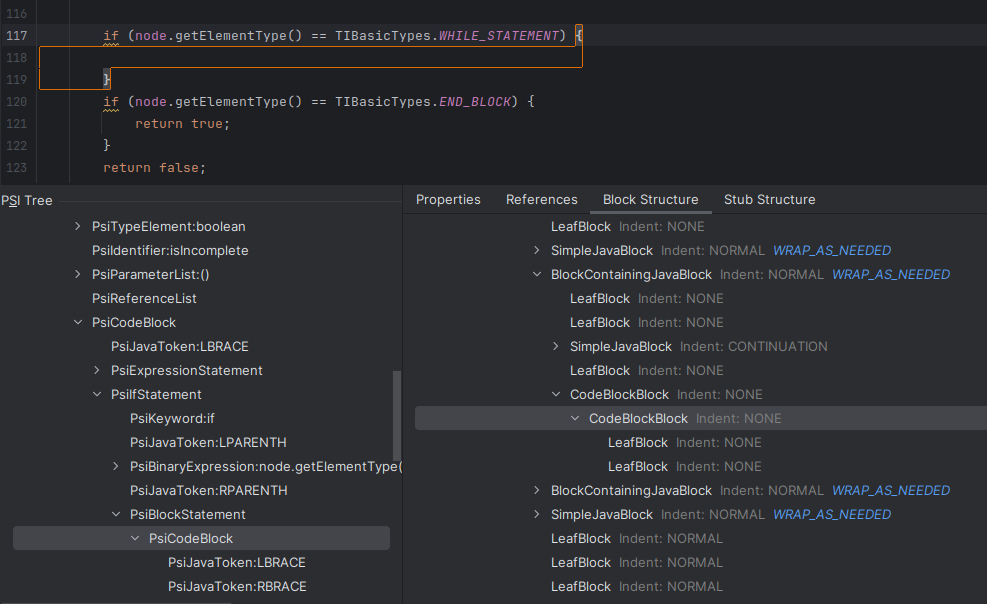
I looked at the block structure of an empty Java block (see the image below), and there is also no indentation applied within the PsiCodeBlock. But the newline does get a normal indentation.
Unfortunately, your post is hard to read as it not formatted, does not provide the block structure of your own language and is hard to understand for somebody not knowing the details of your supported language.
As far as I understand, you’d like to get indentation inside an end block, if it exists.
Your implementation of isIncomplete always makes it invalid, that’s probably wrong if it’s not whitespace only. Making it invalid would cause getChildAttributes to be called for the parent of the end block, if I’m not mistaken.
To fix this, I’d
create a test to simplify development and debugging. I usually add tests for pressing enter and for reformatting a file
make sure that getChildAttributes is called for your end block
Regarding the Java block, it’s not indenting the braces { and }, which is expected. As it’s empty you don’t see indentation of elements between the braces and the block structure does not show the values returned by getChildAttributes, so it’s not helpful for your debugging.
Anywy, I will indeed write a test case for this exact scenario, and play a little bit with the inComplete function to see if I can get the right call to getChildAttributes(), which then returns a normal indent.
Well, writing a good formatter isn’t trivial (for me).
I’d think that the block for the END_BLOCK element shouldn’t be there because it only wraps whitespace. But better verify that…
Also, the block for END_BLOCK shows Indent: NONE and that’s what you’re seeing in the editor, but don’t want it.
Most likely caused by checking the parent node’s type and not the child node when you create child blocks:
For future readers struggling with the same problem: I finally fixed the problem. Turns out my block structure was wrong. If you take a look at the block structure of a JSON array, the entire array is a block, the opening and closing brackets are blocks, and all elements in between are separate blocks. My problem was that I (accidentally) added another block encapsulating all the blocks in between the opening and closing block (like the brackets for JSON). This means that even if there is nothing in between the While and the End, a block ALWAYS existed. The indentation didn’t like that. Compared to my block structure above, it now looks like this: