Integration Tests documentation not sufficient

I have been unsuccessful in following the directions at “Introduction to Integration Tests“ at Introduction to Integration Tests | IntelliJ Platform Plugin SDK. Is there an example from JetBrains that is up to date that I can reference? Could the example, at GitHub - JetBrains/intellij-platform-plugin-template: Template repository for creating plugins for IntelliJ Platform be updated to use

intellijPlatform {//… testFramework(TestFrameworkType.Starter) }

Thank you!

Hi @jwren

I opened a PR on the template repository last week that includes exactly what you are looking for (for UI testing, but can be used for integration the same way).

Since it has not been merged yet, you can apply the changes locally and let me know if they work for you. Your feedback would be greatly appreciated. (Note: I am not from JetBrains, so this is not an official recommendation.)

1 Like

Thank you! I have your code and I have the PluginTest.kt running from the IDE successfully.

My first question… If I modify your code to compile and run PluginTest.kt contents from Introduction to Integration Tests | IntelliJ Platform Plugin SDK I still cannot import Starter (or other references) to run the first trivial example.

I also don’t see a task defined to run the ui test integration (PluginTest.kt), what is the gradle command to run the PluginTask?

  • Jaime

@jwren

The task is in here, look at line 198.

The PluginTest is equivalent to MyProjectUITest, but I moved the Starter into the setup.

This is a repository I created from the fork template of this PR, you can clone that one and compare your Gradle configuration with it.

1 Like

Thanks for the content. Yes, I did see the task, and I am able to run your driver test.

In my Gradle dependencies I have something every similar to your setup, driver packages download for 251 in my example, not 243, but again, when I got to author any kotlin code, I am met with what look like random misses in the classpath:
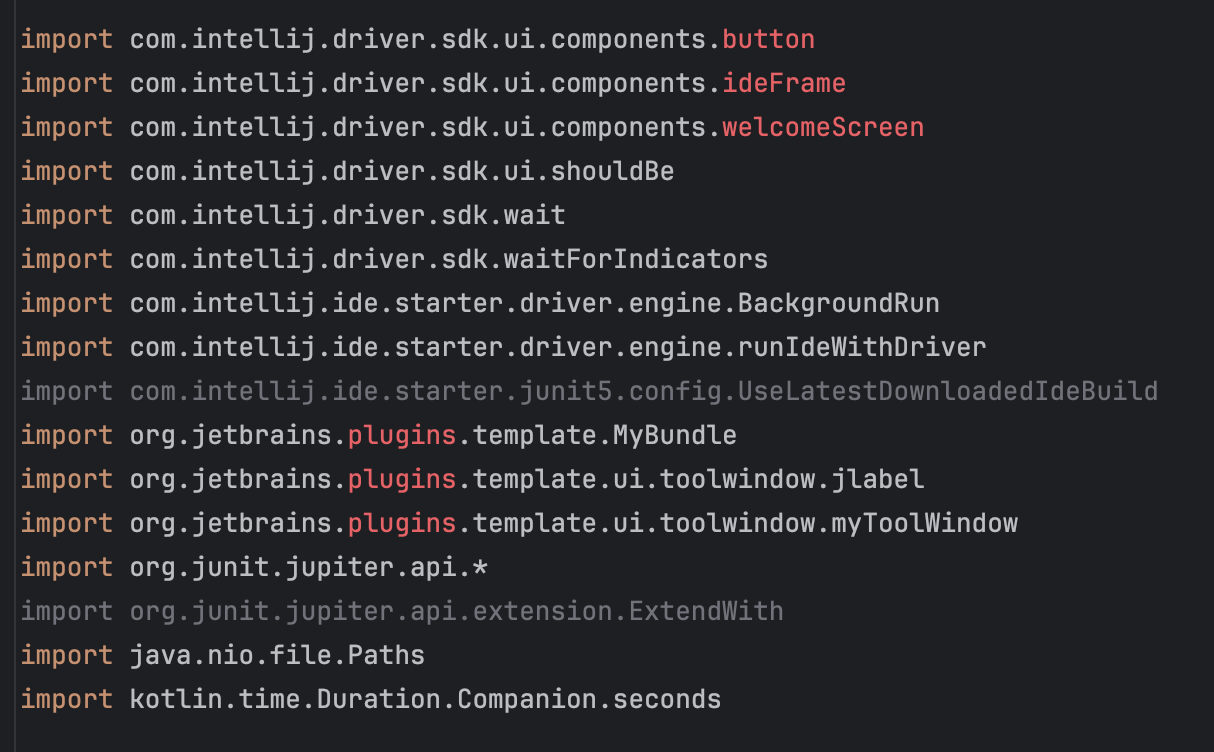
Since v2025.1, those were moved to:
com.intellij.driver.sdk.ui.components.common

You need to delete those imports and re-import those classes….

Thank you again for the example! With it, I was able to get an initial test working locally, I’ll post the PR here when I have it uploaded.

  • Jaime

Watching this video could be a good start at least

1 Like