This only seems to be happening in IntelliJ IDEA Ultimate Edition 2025.2.3 on my Windows machine. I don’t see it in other JetBrains IDEs at the exact same version on Windows, nor do I see it on my Mac/Linux test machines at all. I also don’t see it in IntelliJ IDEA Ultimate Edition 2025.1 or 2025.3 EAP.
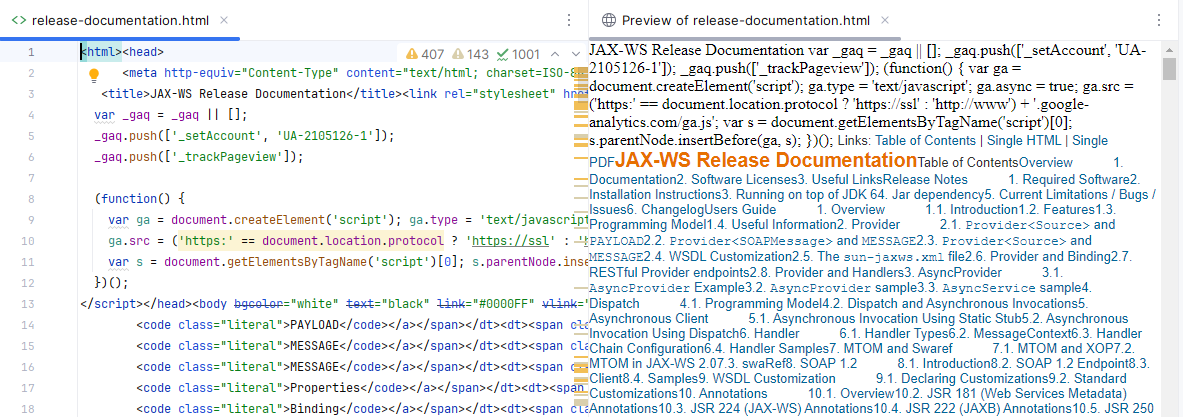
Basically it’s like it’s not interpreting the HTML properly, e.g.:
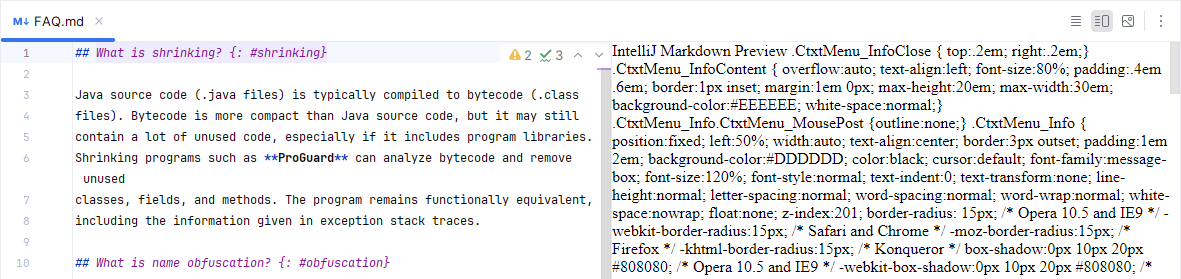
and the same with Markdown preview which is, of course, just converted into HTML and rendered using JCEF:
I’ve completely uninstalled and reinstalled the IDE, though I didn’t have it remove existing config, so maybe something is wedged in the IDE config? I also tried invalidating caches/indices including the Delete embedded browser engine cache and cookies option. Same issue after doing so.
I guess worst case scenario, I’ll do another uninstall telling it to remove config so it’s effectively a scorched earth reinstall and see if that helps or not.
Any idea what’s going on? I considered going straight to YouTrack, but since this is only happening in a single isolated IDE install – albeit my main development IDE install so quite important to me – I figured I’d ask here first in case someone here could provide any insights.
As a bit of additional diagnostic info, there are no errors in idea.log for this IDE instance. Here are the only JCEF-related log entries:
2025-10-06 13:13:50,820 [     34]   INFO - #c.i.p.i.b.AppStarter - JVM options: [..., -Dide.browser.jcef.out-of-process.enabled=false, -Djcef.sandbox.ptr=000002198812FF40, -Djcef.sandbox.cefVersion=122.1.9+gd14e051+chromium-122.0.6261.94]
2025-10-06 13:13:53,322 [   2536]   INFO - STDERR - JCEF_V(13:53:321): Found cef_server binary 'C:\dev\JetBrains\IntelliJIDEA\2025.2\jbr\bin\cef_server.exe' via System.getProperty('java.home')=C:\dev\JetBrains\IntelliJIDEA\2025.2\jbr
2025-10-06 13:13:53,322 [   2536]   INFO - STDERR - JCEF_V(13:53:322): Java is started via native launcher. Found cef_server path C:\dev\JetBrains\IntelliJIDEA\2025.2\jbr\bin\cef_server.exe (via system propety)
2025-10-06 13:13:54,508 [   3722]   INFO - #c.i.u.j.JBCefAppCache - Successfully deleted JCEF browser engine cache at "C:\Users\Scott\AppData\Local\JetBrains\IntelliJIdea2025.2\jcef_cache"
2025-10-06 13:13:54,508 [   3722]   INFO - #c.i.u.j.JBCefApp - JCEF-sandbox is enabled
2025-10-06 13:13:54,519 [   3733]   INFO - #c.i.u.j.JBCefApp - JCEF logging: level=LOGSEVERITY_DISABLE, file=C:\Users\Scott\AppData\Local\JetBrains\IntelliJIdea2025.2\log\jcef_40740.log
2025-10-06 13:13:54,802 [   4016]   INFO - #c.i.u.j.JBCefApp - jcef version: 122.1.9.1059.22a4ed5807c07b641b6bc0f16be496f154a2444b | cmd args: [--disable-features=SpareRendererForSitePerProcess, --no-proxy-server, --disable-gpu-process-crash-limit, --autoplay-policy=no-user-gesture-required, --disable-component-update]
2025-10-06 13:13:56,729 [   5943]   WARN - #org.intellij.plugins.markdown.ui.preview.jcef.impl.JcefBrowserPipeImpl - No subscribers for documentReady!
The first entry is obviously truncated to include only the JCEF-specific options.
Removing this IDE JVM option seems to have resolved the issue:
-Dide.browser.jcef.out-of-process.enabled=false
That was added automatically be the IDE based on a prompt about something not working properly a bit back. But it does explain the difference in behavior between my dev IDE instance where this issue was happening and all of the other IDE instances where it wasn’t.
I’ll likely file an issue in YouTrack assuming I’m able to reproduce this behavior in other environments reliably.
UPDATE: Logged in YouTrack as https://youtrack.jetbrains.com/issue/IJPL-211645.