Hello,I’m developing the MicroPython Tools plugin. One of the features it offers is a REPL terminal to facilitate communicating with the device’s REPL. I use JBTerminalWidget for this, here is how it’s implemented:
private fun jediTermWidget(project: Project, disposable: Disposable, connector: TtyConnector): JComponent {
val componentRegistryService = project.service()
val mySettingsProvider = JBTerminalSystemSettingsProvider()
val terminal = JBTerminalWidget(project, mySettingsProvider, disposable)
componentRegistryService.registerTerminal(terminal)
terminal.isEnabled = false
with(terminal.terminal) {
    setModeEnabled(TerminalMode.ANSI, true)
    setModeEnabled(TerminalMode.AutoNewLine, true)
    setModeEnabled(TerminalMode.WideColumn, true)
}
terminal.ttyConnector = connector
terminal.start()

val widget = BorderLayoutPanel()
widget.addToCenter(terminal)
val actions = ActionManager.getInstance().getAction("micropythontools.repl.ReplToolbar") as ActionGroup
val actionToolbar = ActionManager.getInstance().createActionToolbar(ActionPlaces.TOOLBAR, actions, true)
actionToolbar.targetComponent = terminal
widget.addToTop(actionToolbar.component)
return widget
}
It works great for ANSI color codes, translating input like MicroPython shortcuts (Ctrl + A…), sending arrow keys for going through the MicroPython REPL command history and so on.
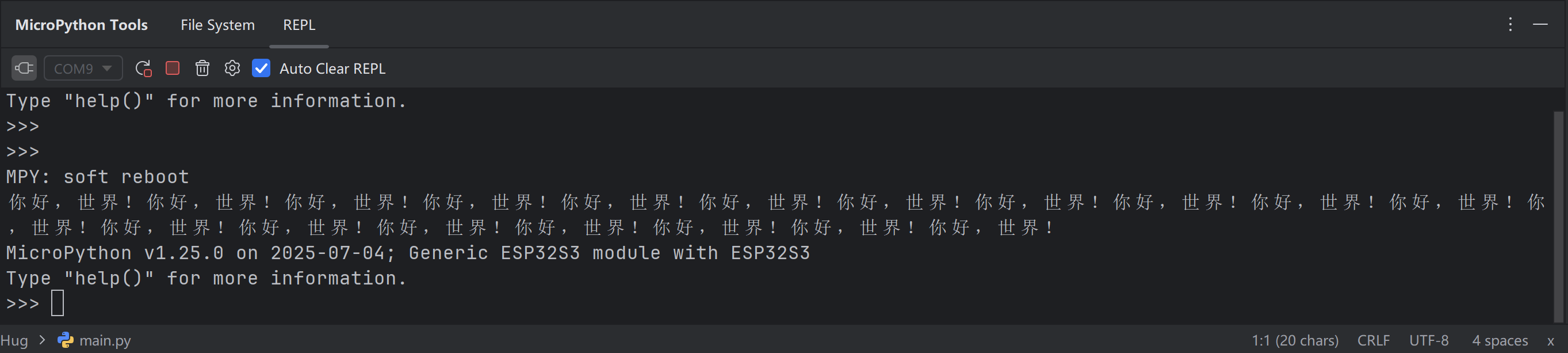
However, some of my plugin’s users are running into problems with CJK character getting truncated:
Is this a known limitation of JBTerminalWidget? Is there some workaround/alternative element that does what JBTerminalWidget does and that would support CJK characters on top of that?
Hello!
We are now working on providing an API for the Reworked Terminal: IJPL-193161
Since the Reworked Terminal is using Editor component to render the output, there should be no problems with CJK characters rendering.
So, I would propose looking into using the Reworked Terminal implementation once API is available. ETA is 2025.3 release.
But regarding the existing problem: it looks like the output is also truncated.
Could you please ask the users to try reproducing the same in the terminal tool window? (but they need to enable Classic terminal engine in Settings | Tools | Terminal)
If they use Windows, I suspect it might be connected to ConPTY bugs.
Please check that they do have -Dcom.pty4j.windows.disable.bundled.conpty=true VM option.
Thank you for the reply and apologies for not following up with you - I missed it.
I forwarded the reply to the user in this GitHub issue. It seems that the problem is simply related to the JBTerminalWidget implementation and the only way from here is waiting for the reworked terminal to become available.
Due to some compatibility issues with older IDE versions, I will be locking my plugin to only support 2025.2+ instead of 2024.3+.
Is the reworked JBTerminalWidget replacement API available? The existing documentation on new terminals wasn’t very helpful in figuring this out, and I don’t understand whether it was added in 2025.2/2025.3 or neither.
Is the reworked API available and what is the oldest IDE version it supports?
Hello! Please refer to the documentation of the Reworked Terminal API: Embedded Terminal | IntelliJ Platform Plugin SDK. This API was added in the scope of 2025.3 release, so it is not available in earlier versions.
I’ve looked at the embedded terminal API and it doesn’t seem like a replacement of the JediTermWidget.
I embed the terminal window in my own plugin tool window. There is no process running on the background, instead REPL output from a MicroPython device is printed there.
I use the ttyConnector for this. It seems like the new embedded terminal isn’t suitable for this use case?
package dev.micropythontools.ui

import com.intellij.openapi.Disposable
import com.intellij.openapi.actionSystem.ActionGroup
import com.intellij.openapi.actionSystem.ActionManager
import com.intellij.openapi.actionSystem.ActionPlaces
import com.intellij.openapi.components.service
import com.intellij.openapi.project.DumbAware
import com.intellij.openapi.project.Project
import com.intellij.openapi.util.Disposer
import com.intellij.openapi.wm.ToolWindow
import com.intellij.openapi.wm.ToolWindowFactory
import com.intellij.terminal.JBTerminalWidget
import com.intellij.ui.content.ContentFactory
import com.intellij.util.ui.components.BorderLayoutPanel
import com.jediterm.terminal.TerminalMode
import com.jediterm.terminal.TtyConnector
import dev.micropythontools.communication.MpyDeviceService
import dev.micropythontools.core.MpyBundle
import dev.micropythontools.core.MpyIcons
import org.jetbrains.plugins.terminal.JBTerminalSystemSettingsProvider
import javax.swing.JComponent

internal class MpyToolWindow : ToolWindowFactory, DumbAware {
override val icon = MpyIcons.micropythonTw

override fun init(toolWindow: ToolWindow) {
    super.init(toolWindow)
    toolWindow.project.service<MpyComponentRegistryService>().registerToolWindow(toolWindow)
}

override fun createToolWindowContent(project: Project, toolWindow: ToolWindow) {
    val deviceService = project.service<MpyDeviceService>()
    val componentRegistryService = project.service<MpyComponentRegistryService>()

    val newDisposable = Disposer.newDisposable(toolWindow.disposable, "MpyToolWindowDisposable")

    val fileSystemWidget = MpyFileSystemWidget(project)
    val fileSystemContent = ContentFactory.getInstance()
        .createContent(fileSystemWidget, MpyBundle.message("toolwindow.file.system.tab.title"), true)
    fileSystemContent.setDisposer(newDisposable)
    toolWindow.contentManager.addContent(fileSystemContent)
    componentRegistryService.registerFileSystem(fileSystemWidget)

    val jediTermWidget = jediTermWidget(project, newDisposable, deviceService.ttyConnector)
    val terminalContent = ContentFactory.getInstance()
        .createContent(jediTermWidget, MpyBundle.message("toolwindow.repl.tab.title"), true)
    terminalContent.setDisposer(newDisposable)
    toolWindow.contentManager.addContent(terminalContent)
    componentRegistryService.registerTerminalContent(terminalContent)
}

private fun jediTermWidget(project: Project, disposable: Disposable, connector: TtyConnector): JComponent {
    val componentRegistryService = project.service<MpyComponentRegistryService>()

    val mySettingsProvider = JBTerminalSystemSettingsProvider()
    val terminal = JBTerminalWidget(project, mySettingsProvider, disposable)
    componentRegistryService.registerTerminal(terminal)
    terminal.isEnabled = false
    with(terminal.terminal) {
        setModeEnabled(TerminalMode.ANSI, true)
        setModeEnabled(TerminalMode.AutoNewLine, true)
        setModeEnabled(TerminalMode.WideColumn, true)
    }
    terminal.ttyConnector = connector
    terminal.start()

    // Clear the buffer first for a consistent UI experience
    terminal.terminalPanel.clearBuffer()
    terminal.terminal.writeCharacters(">>>")

    val widget = BorderLayoutPanel()
    widget.addToCenter(terminal)
    val actions = ActionManager.getInstance().getAction("dev.micropythontools.repl.ReplToolbarGroup") as ActionGroup
    val actionToolbar = ActionManager.getInstance().createActionToolbar(ActionPlaces.TOOLBAR, actions, true)
    actionToolbar.targetComponent = terminal
    widget.addToTop(actionToolbar.component)
    return widget
}

}
I’m running into resize problems where the CJK characters seem to be squashed into single width characters on resize irreversibly. I can’t replicate this in the normal terminal.
I’m on macOS so the VM option isn’t affecting this.
I see, yes, new API won’t work for you at this moment because now we support only the case of creating Reworked Terminal in the Terminal tool window.
There is no API yet to create the Reworked Terminal outside of the tool window. And unfortunately, I have no ETA when it can be implemented.
The issue to follow stays the same: IJPL-193161.
Regarding CJK characters squashing, do you experience the same behavior when resizing the Classic Terminal in the Terminal tool window?
This behavior doesn’t happen in the classic terminal when executing a python file, I tried it in the video. This problem is specific to the JBTerminalWidget so far.
One of my users also tried a ConsoleViewImpl and redirected the device output there. That worked nicely for displaying text, however, ANSI, shortcuts etc. don’t work.
I suppose there’s no workaround for this to try in the meantime?
This behavior doesn’t happen in the classic terminal when executing a python file, I tried it in the video. This problem is specific to the JBTerminalWidget so far.
It is kind of strange, as Classic Terminal is based on JBTerminalWidget, so the behavior should be the same.
Regarding a workaround - I have nothing in my mind at the moment. The issue requires debugging the deeps of resize (com.jediterm.terminal.model.TerminalTextBuffer#resize) and rendering (com.jediterm.terminal.ui.TerminalPanel#paintComponent).
I will appreciate if you try to figure it out.
I’ve just confirmed this behavior also happens with an official JetBrains plugin called “Serial Port Monitor”.
At this point it seems like a bug in the JBTerminalWidget, not something I can affect in code.
Given that this isn’t the only problem with the JBTerminalWidget (Errors such as: 2026-01-26 18:16:04,077 [ 101545] SEVERE - com.jediterm.terminal.model.TerminalTextBuffer - Attempt to get line out of bounds: -1 < 0 are plentiful). I’m not particularly confident in diving into the implementation of JBTerminalWidget internals and looking for the bugs.
Should I make a youtrack issue? Does one exist already? Could I ask you to create one if appropriate so that it is structured the right way?
I would be grateful if you file an issue for the observed behaviour with steps to reproduce them. You can create one in IntelliJ Platform project with subsystem Terminalhttps://youtrack.jetbrains.com/projects/IJPL/issues.
Then I will see it and edit if needed.
I was testing the bug by executing a python script - however that used the run configuration/python run configuration console window - not the actual in-IDE terminal.
This bug is only present in the Classic terminal and not in the reworked one.
I apologize for testing this incorrectly and raising a false alarm.
In this case I presume there is no value in creating a report on YouTrack? Should I wait until there is reworked terminal API for plugin tool windows as well?
If the problem is stably reproduced in the Classic Terminal, then it still would be nice to have an issue for it. Maybe we will fix it if it is not something fundamental.
But the general plan is to wait for the Reworked Terminal API outside of Terminal tool window.
Though, I can definitely say that it won’t happen in the next major release (2026.1).